5 Best Business Development Tools for SaaS Recruiters in 2026
The best SaaS recruiter business development tool is not the one with the biggest contact database. It is the one that tells your desk which software companies matter now, why they matter now, and who you should speak to before the market catches up.
TL;DR
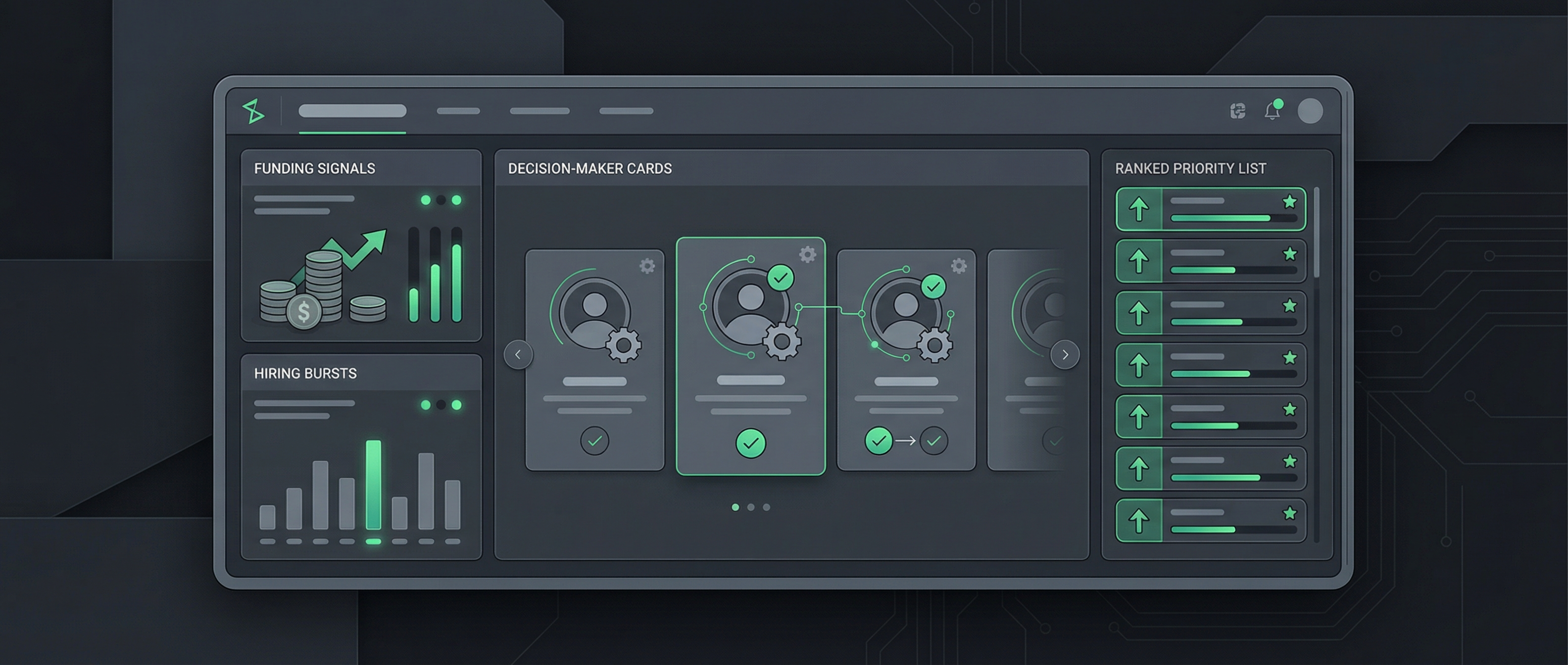
The best business development tool for SaaS recruiters in 2026 is Boilr, because SaaS recruiter BD is a timing problem before it is an outreach problem. LinkedIn Sales Navigator, Apollo, SourceWhale, and Vente AI all solve useful parts of the workflow, but Boilr is the tool in this list that most directly starts with recruiter ICPs, hiring movement, decision-maker context, and action-ready output.[5][6][7]
LinkedIn reports that teams already using or testing generative AI in recruiting save roughly one day of work each week on average, while Bullhorn found firms using AI more deeply were materially more likely to move faster on hiring activity.[1][2] That matters because SaaS recruiters do not need another pretty dashboard. They need a tool that cuts research time, sharpens timing, and gives them a stronger reason to be in the inbox before every other agency sees the same brief.
The problem with most SaaS recruiter business development stacks
Most SaaS recruiters are not short on software. They are short on usable context. The desk already has LinkedIn tabs open, an outreach tool somewhere in the background, a CRM that no one fully trusts, and a vague list of software companies that might be worth calling if someone had time to clean it up.
That stack feels busy, but it usually fails in the same place: it starts with names instead of demand. For SaaS recruiters, the commercial edge comes from spotting product, engineering, data, or GTM hiring pressure before the market gets crowded, then pairing that timing with the right stakeholder and a clear message.
Where the workflow usually breaks
- Wrong starting point — many teams begin with a giant contact database and try to work out relevance afterwards, which flips the recruiter workflow backwards.
- No timing layer — a static list of software companies does not tell you which account just raised, just hired a VP, or just opened eight roles in a tight function.
- Weak owner mapping — the desk ends up with titles that look plausible but do not tell you who actually owns the hiring pain.
- Too much cleanup — if the recruiter has to enrich, dedupe, rewrite notes, and copy records into another tool, adoption dies as soon as delivery work gets busy.
- Generic outreach pressure — the team starts writing messages because the sequence is ready, not because the account has a strong reason to care right now.
- SaaS noise — without a recruiter-first filter, the desk burns time on agency ads, weak-fit software categories, or companies whose hiring motion does not match the niche at all.
The stat that matters: Bullhorn's 2025 research says recruiters believe AI can save about 17 hours per week, including 4.5 hours on searching alone.[2]
For SaaS recruiter BD, that is the real buying case: reclaim research time upstream so the team can spend more of the week in conversations that actually have commercial potential.
If the platform does not improve the first half of the workflow, it rarely improves the outcome. That is why the next question is not which tool has the longest feature sheet. It is what the market has changed enough to make this decision urgent now.
Why this matters now for SaaS recruiters
This category got more important over the last year, not less. Buyers are more self-directed, recruiters are under pressure to do more with less admin, and software companies continue to create demand in bursts instead of in tidy, predictable quarters.
Five shifts making the old workflow slower every month
- AI has moved from experiment to expectation — LinkedIn found 37% of organisations are actively integrating or experimenting with generative AI in hiring, up from 27% the year before, and users report significant weekly time savings.[1]
- Recruiters are buying time, not just features — Bullhorn's report shows the biggest perceived value of AI is not theory but saved hours in sourcing, searching, and operational work.[2]
- B2B buyers research more on their own — HubSpot's B2B buyer research shows decision makers increasingly prefer self-education before speaking to sales, which means your message has to feel informed from the first touch.[4]
- SaaS hiring moves in visible signals — Boilr's own positioning leans into funding, expansion, executive changes, new hires, and role clusters because those events consistently create a clearer commercial opening.[7]
- The desk cannot support more tabs — HubSpot's sales research shows teams value AI most when it saves time and surfaces better insights, not when it adds another place to look.[3]
| Market shift | What it changes for SaaS recruiters | What the tool now needs to do |
|---|---|---|
| Higher AI adoption | Manual market mapping feels more expensive because better automation is now normal. | Surface opportunities fast and reduce search time without adding more admin. |
| More self-educated buyers | Generic recruiter outreach lands worse when buyers already know the market language. | Give the recruiter a specific, observable reason to reach out. |
| Bursty SaaS hiring | Value concentrates in narrow windows around funding, leadership changes, and role clusters. | Track signals and rank which accounts deserve attention this week. |
| Tool fatigue on the desk | Consultants stop using complex stacks when delivery pressure rises. | Move from signal to action with less copy-paste and less interpretation. |
This is exactly why broad prospecting software often feels fine in a demo and frustrating on a live recruitment desk. The next job is to define what a genuinely good SaaS recruiter BD workflow should look like before you compare the tools themselves.
What good looks like in a SaaS recruiter business development tool
A good SaaS recruiter tool does not just make outbound possible. It changes what the desk works on and how confident the desk feels about that choice. That means the evaluation criteria should follow the real commercial workflow, not the generic sales workflow.
The six criteria that matter most
- SaaS account discovery — the platform should help your team find real software employers in the niches and geographies you actually work.
- Timing signals — the output should explain what changed, not force the recruiter to infer urgency from thin data.
- Hiring-owner context — the tool should move the desk closer to the person who can sponsor the search or influence it internally.
- Low-friction handoff — if the opportunity cannot move into the CRM, ATS, or workflow quickly, it becomes another side project.
- Adoption under pressure — the best test is whether a busy consultant still uses it on a Wednesday morning when three delivery issues are already waiting.
- Price clarity — SaaS recruiter teams need to understand whether they are buying seats, credits, leads, or a black box that gets more expensive after the first month.
How these criteria map to the buying decision
| Criterion | What to ask in the demo | Why it matters |
|---|---|---|
| Signal quality | Does the platform show why a SaaS account matters now, not just who works there? | SaaS recruiters win when the trigger is visible and the message lands in context. |
| Direct-employer discovery | Can the team find real software employers instead of spending hours filtering noise? | Admin-heavy list building kills recruiter consistency before outreach even starts. |
| Decision-maker mapping | Does the output get you closer to the hiring owner, not just a generic talent contact? | The quality of the first conversation depends on who sees it and why they care. |
| Workflow handoff | Can the recruiter move from opportunity to CRM, ATS, or outreach without copy-paste chaos? | If the workflow leaks time at the handoff, the desk stops using it when things get busy. |
| Time-to-value | Will the average consultant understand the output and act on it quickly? | A clever platform that needs an ops person to babysit it usually fails inside a live desk. |
| Commercial clarity | Is pricing and usage predictable enough for a founder or manager to trust the spend? | Software becomes politically expensive long before finance cancels it. |
- Timing beats list size — A smaller set of well-timed software accounts usually beats a longer generic list every week.
- Context beats contact count — One accurate hiring owner with a clear trigger is worth more than ten random titles from the right department.
- Workflow beats theory — If the output does not travel cleanly into the desk process, the tool will not survive the first busy month.
- Usable data beats more data — The recruiter needs filtered, actionable signal-rich accounts, not another export to clean manually.
If you want the longer version of this logic, Boilr already covers parts of it in which hiring signals actually lead to meetings, how to find companies that are actually hiring, and how to qualify hiring intent. The short version is simpler: pick the tool that removes judgement work upstream, not the one that just adds more sending capacity downstream.
The 5 best business development tools for SaaS recruiters in 2026
This ranking is recruiter-first on purpose. We weighted timing, discovery, decision-maker context, and workflow fit more heavily than generic outbound volume. If you run a broad SDR motion instead of a SaaS recruitment desk, you would probably rank these differently. That is exactly the point.
Shortlist at a glance
| Rank | Tool | Best for | Pricing | What stands out |
|---|---|---|---|---|
| #1 | Boilr | SaaS recruiters who want signal-led prospecting, recruiter ICPs, decision-maker context, and CRM-ready output in one workflow | Sales-led / demo-based | Discovery, signals, AI scoring, verified contacts, recruiter workflow |
| #2 | LinkedIn Sales Navigator | Relationship-led SaaS recruiters who already live in LinkedIn and want better account and stakeholder research | From US$119.99 per month per licence | Account research, stakeholder mapping, network context, familiar daily workflow |
| #3 | Apollo | Teams that already know their target SaaS accounts and mainly need contact coverage plus outbound sequencing | Free tier; paid plans from US$49 per user per month | Contact data, sequencing, enrichment, outbound workflow |
| #4 | SourceWhale | Recruiter teams that want sourcing, outreach, notes, and ATS or CRM workflow in a recruitment-focused platform | Demo-led / custom quote | Sourcing, recruiter outreach, notes, ATS/CRM workflow, data refresh |
| #5 | Vente AI | Small and mid-sized recruitment teams that want job-led opportunity flow with transparent pricing | From £199 per month | Job-led leads, de-duped vacancies, hiring-manager context, CRM push |
1. Boilr — best overall for signal-led SaaS recruiter BD
Boilr ranks first because it is designed around the front half of recruiter business development: which companies fit the niche, what changed, who likely owns the problem, and what the desk should work today. That matters more for SaaS recruiters than another horizontal contact database because software markets reward earlier, more contextual outreach.[5][6][7]
- Recruiter ICP filtering — Boilr is explicit about helping agencies define and filter around the right account profile instead of handing over an ocean of software companies.[6]
- Signal-led prioritisation — the platform tracks funding, executive changes, new hires, expansion, recruiter history, and other signals that tell the desk why now matters.[7]
- Daily output — the product language focuses on surfacing qualified opportunities each day, which maps directly to the rhythm of a recruitment desk.[6]
- Decision-maker context — Boilr ties lead discovery to likely hiring-manager information and verified contactability instead of stopping at a company name.[5]
- AI scoring — the system scores and ranks the work so the desk spends less time debating what deserves attention first.[6]
- CRM handoff — Boilr's workflow is built around moving insight into outreach tools or CRM systems quickly rather than leaving it as dashboard theatre.[7]
Pros
- Signal-first workflow — starts with hiring movement and fit instead of a cold account list.
- Recruiter-shaped output — built around recruiter ICPs, daily lead flow, and decision-maker context.
- Lower research burden — cuts the amount of manual market mapping the desk has to do before outreach starts.
- Better first messages — gives recruiters a clearer reason to reach out with something specific.
- CRM-ready handoff — designed to move from signal to action quickly.
Cons
- Sales-led pricing — there is less public plan transparency than with self-serve tools.
- Less generic sequencing depth — it is not trying to be a classic outbound sales platform first.
- Opinionated workflow — teams looking for a blank-canvas data builder may want more custom freedom.
2. LinkedIn Sales Navigator — best for relationship mapping inside SaaS accounts
Sales Navigator comes second because it remains the cleanest way to understand who is inside a software company, how the stakeholder map is changing, and which conversations might be warm enough to pursue. Its pricing is public, the interface is familiar, and most recruiters already spend a large part of their day in LinkedIn anyway.[9]
- Stakeholder visibility — Sales Navigator is excellent when you already know the company and want to map the VP Talent, Head of Engineering, Head of People, or functional leader around the hiring problem.[9]
- Familiar daily habit — recruiters do not need to learn an entirely new behaviour to use it because it fits naturally inside existing LinkedIn research.
- Strong for multi-threading — if a SaaS account needs several stakeholders touched, Sales Navigator helps you see who matters beyond the obvious talent contact.
- Useful for retained search — a recruiter working executive, product, or GTM retained mandates will often keep it open even if another tool handles discovery.
- Weak as the whole system — the recruiter still has to decide which companies matter now, what changed, and where to log the work after research.
Pros
- Relationship context — helps recruiters understand who sits around the decision.
- Low learning curve — fits a habit most recruiters already have.
- Public pricing — easier to compare than many enterprise recruiter tools.[9]
- Good for multi-threading — useful when more than one stakeholder shapes the brief.
Cons
- Manual timing work — the recruiter still has to infer urgency from what they see.
- Weak workflow handoff — not built to run the whole recruiter BD motion end to end.
- Research-first, not action-first — great context layer, weaker operating layer.
3. Apollo — best when SaaS recruiters already know the accounts and need outbound muscle
Apollo earns third place because it is useful once the desk already knows who it wants to target. Public pricing is clear, self-serve entry is simple, and the product bundles contact data, enrichment, and sequencing into a recognisable B2B outbound workflow.[10]
- Good contact coverage — Apollo helps the team move from a target account list to reachable contacts quickly.[10]
- Built-in sequencing — useful for desks that run a disciplined, repeatable email or multichannel outreach process.[10]
- Clear pricing ladder — free, then US$49, US$79, and US$119 tiers make initial budget discussions easy.[10]
- Works well after prioritisation — if another tool surfaces the right SaaS accounts first, Apollo can handle the send-and-follow-up layer reasonably well.
- Less recruiter-native — the platform is still designed for broad GTM teams, so the recruiter has to create more meaning around the data manually.
Pros
- Accessible pricing — easy to test without a long enterprise cycle.[10]
- Outbound workflow — sequences and enrichment live in one place.
- Strong second-half tool — useful after the right accounts are chosen.
- Low friction for small tests — simple to get started compared with demo-led platforms.
Cons
- Weak signal-first logic — does not naturally start with recruiter timing.
- Generic GTM framing — the recruiter still has to interpret what matters in a hiring context.
- Credit behaviour — value can feel less predictable once teams start pulling more data than they really need.
4. SourceWhale — best for recruiter workflow after the account is identified
SourceWhale is a strong option when the team wants a more recruitment-shaped operating layer across sourcing, outreach, notes, and data refresh. It is not the tool in this list I would choose first for signal-led SaaS account discovery, but it is a credible option when the workflow bottleneck sits after the account is known.[11]
- Recruiter-native modules — SourceWhale openly frames its product around sourcing, data, outreach, conversations, notes, and ATS or CRM workflow rather than generic GTM operations.[11]
- Good for workflow consolidation — teams that want fewer separate recruiter tools may like its broader day-to-day surface.
- Useful for relationship nurture — outreach and notes support longer recruiter relationship cycles more naturally than a pure sales sequencer.
- Better once the target is known — the product becomes more compelling after the right account list exists.
- Less compelling for earlier account timing — it is not as explicit about signal-led SaaS opportunity discovery as Boilr or job-led tools.
Pros
- Recruiter workflow fit — sourcing, outreach, notes, and CRM or ATS flow sit closer together.
- Good for nurture — helpful when the motion depends on consistent, personalised follow-up.
- Operational breadth — covers more day-to-day recruiter activity than a pure database tool.
- ATS and CRM language — product messaging clearly reflects recruiter workflow reality.[11]
Cons
- Less signal-led — weaker at telling you which SaaS account matters first.
- Pricing opacity — harder to compare quickly because public pricing is not prominent.
- May overlap with existing stack — some teams already own parts of this workflow elsewhere.
5. Vente AI — best for lean teams that want job-led SaaS opportunity flow fast
Vente AI earns the fifth slot because it solves a real problem cleanly: job-led lead generation with transparent pricing and recruiter language. The platform talks about de-duped job signals, agency-listing removal, hiring-manager context, and a public plan structure starting from £199 per month, which is refreshingly direct for this category.[12][13]
- Job-led relevance — if your team wants demand anchored in visible vacancies, Vente is easy to understand and explain.
- Transparent pricing — Solo, Core, Pro, and Elite plans make budget conversations easier for smaller teams.[13]
- Cleaner than raw job board scraping — the value is not just seeing jobs; it is getting a de-duped, recruiter-friendly feed that removes obvious agency noise.[12]
- Good for owner-led desks — founder-led or team-lead-led agencies often like tools where the commercial story is visible in the first week.
- Narrower operating layer — the product is sharper as a lead feed than as a broader recruiter operating system.
Pros
- Clear time-to-value — recruiters quickly understand what they are getting and why it matters.
- Public pricing — useful for lean agencies that do not want a mystery quote.[13]
- Job-led output — gives the desk visible hiring demand instead of pure list size.
- Useful for lean teams — a straightforward fit for smaller agencies that need momentum fast.
Cons
- Narrower scope — less complete than a broader signal-plus-workflow platform.
- Heavier job dependency — strongest when visible job activity is the main trigger you want to trade on.
- Less strategic context — weaker on broader software-company movement than a fuller signal model.
If you want the closest adjacent reading to this comparison, Boilr already has companion pieces on business development tools for recruitment agencies, Apollo alternatives for recruiters, and SourceWhale alternatives. This article narrows the lens: what matters specifically when the end market is software companies that hire in bursts and buy with context.
How we evaluated these tools for SaaS recruiter business development
"Best" only means something if the test is honest. For this article, we judged the tools against the live SaaS recruiter workflow, not against a generic outbound or RevOps motion. That means the weighting is different from the way most comparison pages are written.
The five-part test we used
- Start-point test — does the tool start with likely demand, or does it dump the recruiter into broad data and ask them to do the hard thinking themselves?
- SaaS relevance test — can the platform narrow toward software company motion, role clusters, and the kind of headcount signals SaaS recruiters actually care about?
- Stakeholder test — does it help the recruiter find the likely hiring owner or influential internal sponsor faster?
- Desk-reality test — would a busy consultant still use this when delivery work is noisy and time is tight?
- Commercial test — is the cost profile clear enough that a team leader can predict value before the usage model becomes painful?
| Live scenario | What we wanted the tool to do | Why it matters for SaaS recruiters |
|---|---|---|
| Series A engineering build-out | Surface the company early, explain the trigger, and point toward the owner of the hiring problem. | This is the classic window where speed and context beat volume. |
| New VP Sales and first AE cluster | Show the account shift and give the recruiter enough contact or role context to write a credible first message. | GTM hiring often creates a narrow but high-value opening for external support. |
| European expansion | Identify the signal and help the team move from insight to action without a long cleanup process. | Multi-market hiring gets messy fast when the handoff is weak. |
| Already-known target list | Support reachable contacts, nurture, sequencing, and consistent follow-up. | Not every desk needs discovery first; some need stronger execution second. |
This matters because the same tool can look brilliant or weak depending on the order of the problem. The next section is the real dividing line: why signal-led prospecting keeps outperforming database-led prospecting in SaaS recruitment.
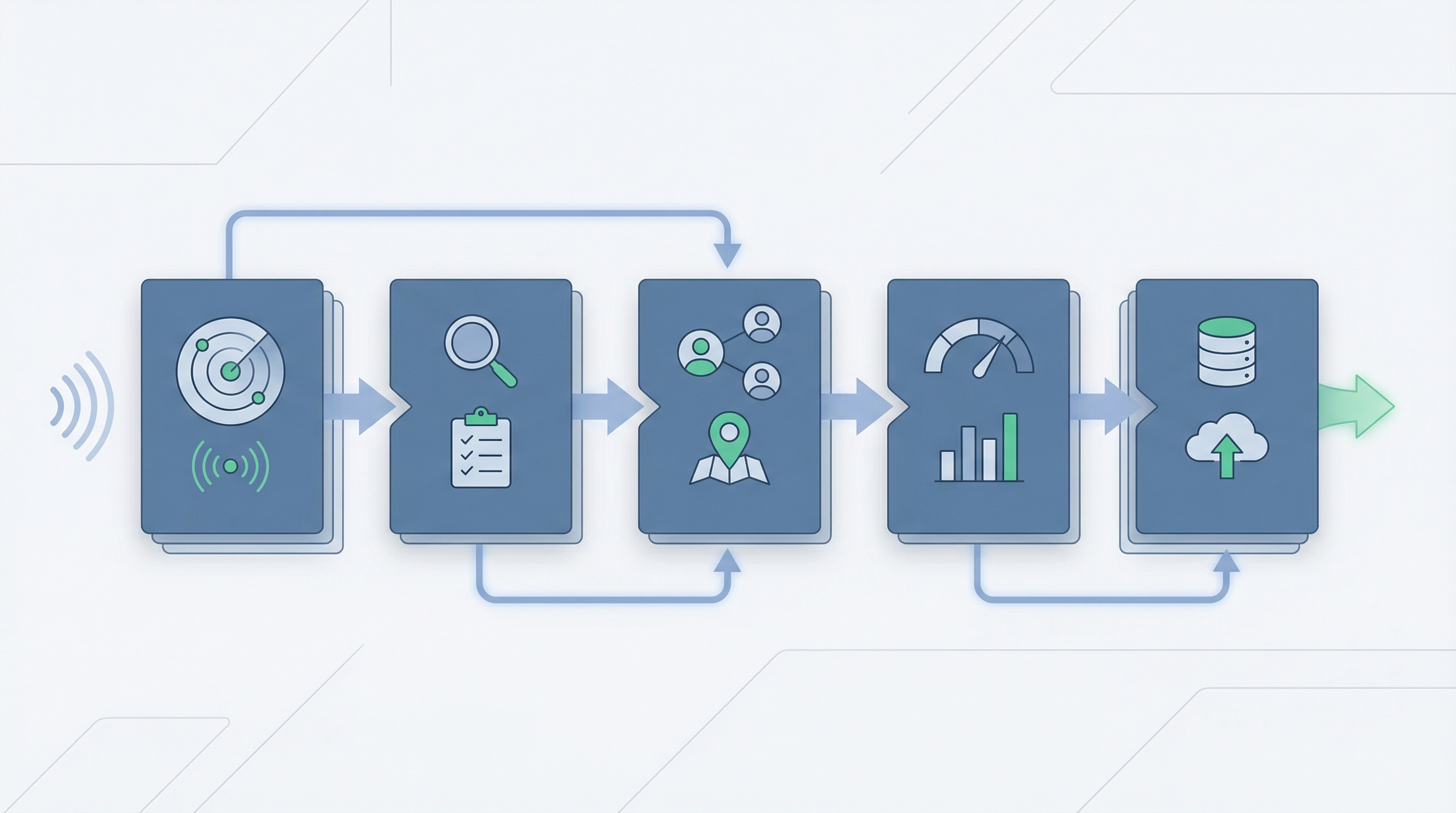
Why signal-led prospecting beats database-led prospecting for SaaS recruiters
This is the strategic point underneath the whole ranking. SaaS recruiter business development is usually won before the email goes out. The team that notices the market shift first and frames it better gets the cleaner conversation.
What signal-led work changes in practice
- Series A urgency — a funded devtools company hiring eight engineers is a different proposition from a random software firm with a similar headcount.
- Leadership change context — a new VP Product or VP Engineering often creates both urgency and openness to external help.
- Role-cluster visibility — when a software company opens several related GTM or product roles at once, the recruiter can speak to pattern, not just vacancy.
- Earlier outreach — the best messages land before the whole market is replying to the published role.
- Higher-quality first calls — the recruiter sounds informed because the outreach references an observable shift, not a generic assumption.
- Cleaner prioritisation — a signal-led queue makes it easier for managers to coach what the team should work first.
| SaaS hiring situation | What a database-led workflow gives you | What a signal-led workflow gives you |
|---|---|---|
| Seed company hires first VP Sales | A contact list and generic titles. | A reason to discuss GTM build-out, sales hiring pressure, and who owns the decision. |
| Series B startup opens six product and engineering roles | Possible contacts with no real urgency attached. | A stronger story around scale pressure, hiring speed, and where agency help may land. |
| US SaaS company expands into Germany | Broad regional contacts and a lot of research still to do. | A visible market move you can anchor outreach around, with localisation relevance built into the message. |
| Head of Talent joins after a funding event | One more name in a long export. | A sharper opening about hiring cadence, role clusters, and where external support could reduce backlog. |
"Most recruiter outbound sounds generic because the tool made the work generic first. If you start with a real trigger inside a software company, the message almost writes itself."
– Felix Hermann, Cofounder @ Boilr
If that logic resonates, the operational question becomes practical: how should a SaaS recruiter actually build the stack and the weekly rhythm around it so the desk uses it consistently?
How to build a SaaS recruiter business development stack that people actually use
The fastest way to waste budget here is to buy the tool and leave the workflow vague. Good BD software only compounds when the team knows how to use it inside the week, not just what it can theoretically do in a demo.
A practical six-step rollout
- Define one live niche — pick one software segment, one geography, and one role family so the output can be judged against real desk needs.
- Choose the trigger set — decide which signals actually matter for that niche: funding, VP hires, engineering bursts, expansion, recruiter history, or something else.
- Set a daily review block — give the desk one non-negotiable block each day to review surfaced accounts and push the best ones into action.
- Standardise the first note — every surfaced account should carry a short note: what changed, who matters, and why now.
- Measure trust and admin — do not just count leads; track whether consultants trust the prioritisation and how much cleanup still sits between insight and outreach.
- Tighten after two weeks — remove weak triggers, double down on the ones that create real conversations, and trim any tool overlap the team is clearly ignoring.
7-day checklist
- Pick one desk — do not roll out to everyone at once.
- Pick one ICP — avoid vague market definitions.
- Pick one trigger set — funding, leadership, or role clusters.
- Pick one output rule — what gets pushed to the CRM and when.
- Avoid stack fantasy — do not design for a future ops team you do not have yet.
- Avoid vague success metrics — 'better visibility' is not enough.
| Week | Focus | Expected output |
|---|---|---|
| Week 1 | Narrow ICP, choose triggers, define what a good account looks like. | First clean shortlist the desk actually agrees with. |
| Week 2 | Run daily review blocks and standardise notes before outreach. | Cleaner messages and fewer low-conviction touches. |
| Week 3 | Measure trust, speed, and conversion into conversations. | Evidence of which triggers and tool surfaces are actually useful. |
| Week 4 | Cut redundant steps, refine messaging, and lock the manager review cadence. | A repeatable BD habit instead of another software experiment. |
Once the team knows how the rhythm should work, it becomes easier to see where Boilr fits specifically — and why it ranks above the other tools here for the SaaS recruiter use case.
How Boilr fits the SaaS recruiter workflow better than the usual stack
Boilr works better than the usual stack because it is not trying to bolt recruiter logic onto generic sales tooling after the fact. It is built around the sequence SaaS recruiters actually need: discover relevant software companies, monitor live hiring movement, rank what matters, identify the likely owner, and move that context into action with less admin.[5][6][7][8]
What changes when Boilr is the operating layer
| Recruiter problem | Typical stack answer | How Boilr answers it |
|---|---|---|
| Which SaaS accounts should we work this week? | Export a broad list and filter it manually. | Use recruiter ICP filters and signals to narrow the queue before the team starts working. |
| Why now? | Guess from job posts or LinkedIn movement. | Track funding, leadership, hiring bursts, and other visible triggers directly.[7] |
| Who owns the hiring pain? | Search LinkedIn and hope the title is right. | Pair account movement with hiring-manager context and verified contact details.[5] |
| How does the team stay consistent? | Everyone builds their own search habits. | Boilr gives the desk a shared filter set, signal logic, and scoring language. |
| How fast can we act? | Copy, paste, enrich, and rewrite notes across tools. | Export to CRM or outreach workflow from the same operating context.[7] |
Ten product capabilities that matter in this use case
- ICP setup — lets the team define which software companies actually fit the niche before prospecting starts.
- Discovery feed — surfaces qualified software accounts each day so the desk is not starting from a blank search.[6]
- Signal monitoring — tracks funding, new hires, executive moves, expansion, and other triggers in near real time.[7]
- AI scoring — ranks surfaced accounts so the team can act on the best slice first.[6]
- Decision-maker lookup — adds the people layer the recruiter needs to turn a company signal into an actual conversation.
- Verified contact data — makes the first touch practical without forcing another enrichment step.[5]
- Direct-employer focus — reduces noise from the wider market and keeps the workflow pointed at real employers.
- Custom alert rules — helps different desks or niches tune the signal set around what actually converts for them.[7]
- CRM or outreach export — cuts the gap between insight and action so the lead does not die in a spreadsheet.[7]
- Manager-friendly workflow — creates a shared language around fit and urgency, which makes desk coaching easier.
Pros
- Better starting point — discovery and signals reduce empty-market research.
- Sharper first outreach — the recruiter has a specific market trigger to anchor the message.
- High desk adoption potential — designed for people who do not want to become RevOps operators.
- Natural fit for SaaS niches — especially strong where software hiring moves in bursts and visible patterns.
- Supports consistent management — creates cleaner review language for team leads and founders.
Cons
- Less pure self-serve — not ideal if you insist on buying without any demo or conversation.
- Not built for every non-recruiter use case — it is intentionally specialised around agency BD.
- May overlap with existing point tools — teams with a big legacy stack need to simplify or accept some redundancy.
Put differently: if your biggest problem is sending more generic sequences, Apollo may still help. If your biggest problem is knowing which SaaS companies deserve that attention in the first place, Boilr is solving the more valuable half of the motion.
Decision framework: which tool should a SaaS recruiter actually choose?
Most buying mistakes happen because the agency chooses the tool it admires, not the tool the desk will truly use. The simplest way to avoid that is to match the product to the operating reality honestly.
Use-case fit by team situation
| If this sounds like you | Best pick | Why |
|---|---|---|
| You want the strongest signal-led starting point for selling into software companies. | Boilr | It is the clearest fit for discovery, signals, scoring, and recruiter-shaped action. |
| You already know the target accounts and mostly want stakeholder mapping inside LinkedIn. | Sales Navigator | Best for relationship context and multi-threading on known accounts. |
| You already know the accounts and need contacts plus sequences without a long buying cycle. | Apollo | Good second-half tool once the prioritisation problem is already solved. |
| You want recruiter workflow breadth across sourcing, outreach, and notes. | SourceWhale | Better operating surface for recruiter workflow after the account is identified. |
| You run a lean team and want visible, job-led SaaS demand with transparent pricing. | Vente AI | Clear value and public plans make it a sensible fit for smaller agencies. |
A final honesty check before you buy
- If your desk lacks prioritisation — buy signal-led discovery first.
- If your desk lacks contactability — add a data or outreach layer second.
- If your desk lacks consistency — choose the product that creates a daily habit, not the one with the most modules.
- If your desk lacks ops capacity — avoid tools that need constant building and governance to produce obvious value.
- If your desk already has the list — do not overbuy discovery when the real gap is execution.
When Boilr is the obvious choice — You sell into software companies, your team needs a stronger reason to reach out, and the current stack creates too much manual market mapping before action starts.
When another tool may be enough — You already know the accounts cold, your desk is disciplined, and the remaining problem is mainly relationship research, contact coverage, or execution workflow.
That is the most honest conclusion. The best tool depends on where your motion breaks. But for the most common SaaS recruiter problem — finding the right software companies earlier, with a better reason to call — Boilr is the strongest overall answer.
Real-world SaaS recruiter scenarios and which tool fits each one
Abstract feature talk only gets you so far. The better way to evaluate these tools is to imagine the exact brief shape or client-development situation you see on the desk every week, then ask which platform reduces the most wasted effort in that specific scenario.
Nine common scenarios we see on software-focused desks
- The Series A engineering ramp — a recently funded infrastructure startup opens a cluster of backend, platform, and DevOps roles. The recruiter needs to see the funding signal, understand the hiring burst, identify the likely engineering owner, and move quickly before every specialist agency jumps in. Boilr is the strongest fit here because the signal itself is the commercial opening.
- The first GTM build — a founder-led SaaS company hires its first VP Sales, then quickly adds AEs, SDRs, and RevOps roles. A relationship-research layer like Sales Navigator helps map the new team, but the recruiter still needs a better reason to prioritise the account early. This is where a signal-led stack beats generic outbound volume.
- The product org rebuild — a software company swaps out product leadership and starts hiring PMs, designers, and analytics talent. The account may not look dramatic in a broad database, but to a specialist recruiter the leadership change plus role cluster is exactly the kind of move worth trading on. Boilr or a similarly signal-led workflow makes that visible faster.
- The warm target-account list — the team already knows the twenty software companies it wants to work and mainly needs the right people plus consistent follow-up. This is the cleanest Apollo use case, and SourceWhale can also shine if the recruiter wants a more recruiter-native outreach and notes workflow.
- The retained search stakeholder map — a recruiter is already engaged on a senior role and needs visibility into adjacent internal stakeholders, future buyers, and possible expansion angles. Sales Navigator is excellent here because the workflow is less about discovery and more about relationship intelligence around a known account.
- The lean solo or two-person desk — a small agency does not want to stitch six tools together and mainly needs visible client-development opportunities with minimum setup. Vente AI becomes attractive in this case because job-led demand and public pricing are easy to understand, even if the product is narrower than a broader operating layer.
- The cross-border expansion play — a US software company starts hiring in London, Berlin, or Amsterdam. The desk needs local-market timing, the probable owner of the regional build-out, and a way to prioritise accounts with real traction instead of generic market interest. A signal-first approach gives the recruiter a much stronger first message than a country filter alone.
- The account-management crossover — an existing client is stable, but the recruiter wants to expand wallet share into adjacent functions or leadership hires. Sales Navigator can help with map depth, while Boilr can help show which new signals suggest the timing is right for a wider conversation now rather than later.
- The busy-desk collapse — three consultants swear they will use the new tool, then delivery pressure spikes and everyone falls back into browser tabs and memory. This is the adoption test that matters most. Tools that need too much manual interpretation or too many handoffs lose here fast, which is why recruiter-first workflow fit matters so much.
| Scenario | Best fit | Why |
|---|---|---|
| Funded startup hiring in bursts | Boilr | The recruiter needs timing, fit, and likely owner context before the rest of the market catches up. |
| Known software accounts, weak contact layer | Apollo | Best when the prioritisation problem is already solved and the missing layer is contact plus sequencing. |
| Executive stakeholder mapping | Sales Navigator | Still the cleanest interface for understanding who sits around the buying or hiring decision. |
| Recruiter workflow consolidation | SourceWhale | Useful when the team wants sourcing, outreach, notes, and recruiter workflow closer together. |
| Lean agency needing quick lead flow | Vente AI | Job-led output and public pricing create faster time-to-value for smaller teams. |
Thinking in scenarios forces the buying decision back into reality. The other useful exercise is to study how good tools end up looking bad because the buying process around them was sloppy from the start.
Buying mistakes that make good recruiter tools look worse than they are
A lot of disappointment in this category is self-inflicted. The software may not be perfect, but many teams also buy without defining the actual job to be done, which means even the right platform gets judged against the wrong expectation three weeks later.
Eight mistakes that create avoidable regret
- Buying around features, not workflow — teams get seduced by long product tours and forget to ask what the recruiter will actually do differently on Tuesday morning. A smaller feature set with cleaner output often beats a giant platform with weak daily behaviour change.
- Confusing research with action — a tool can feel smart because it shows lots of account context, but the desk still stalls if that context does not turn into a ranked list and a clean next step. Sales Navigator is the classic example of something valuable that still needs another layer if discovery is broken.
- Ignoring admin cost — founders compare licence price but ignore the hidden cost of duplicate exports, manual notes, and data cleanup. Bullhorn's efficiency framing matters here because the biggest commercial gain often comes from reduced searching, not cheaper seats.[2]
- Testing too many niches at once — when you run three functions, four geographies, and two desk models through a new platform on day one, the feedback becomes noisy and useless. The right test is tight and narrow.
- Letting the best consultant define the rollout — a disciplined top biller can make almost any stack work. The better question is whether your average consultant, under normal pressure, will still use the product without heroic discipline.
- Treating outreach as the starting point — if the team starts by asking how the sequence works, it is often already solving the second problem first. For SaaS recruiters, account selection and timing quality usually matter more than the send button.
- Chasing a stack fantasy — agencies often buy for the polished future operating model they imagine, not the reality they have. If you do not have a RevOps person, do not build your whole recruiter stack as if you do.
- Failing to kill overlap — once a new tool proves itself, some old steps need to disappear. If the desk keeps half-using the old workflow and half-using the new one, every platform starts feeling confusing and underpowered.
| Mistake | What it looks like | What to do instead |
|---|---|---|
| Overbroad pilot | Everyone tests everything and no one can explain why the output feels mixed. | Run one desk, one niche, one trigger set, and one clear success metric. |
| Feature-led buying | The team remembers the demo but cannot describe the new daily habit. | Define what the recruiter should stop doing and start doing before the demo even begins. |
| No manager review rhythm | The platform produces output, but no one inspects whether the desk trusts or acts on it. | Review surfaced accounts weekly and coach the why-now note quality, not just activity count. |
| Keeping the old workflow alive | Consultants bounce back to browser tabs and memory because the new method never became the default. | Force one daily block where the team must work from the new output first. |
Quick pre-buy checklist
- Name the broken step — discovery, timing, contactability, or workflow handoff.
- Choose the live niche — software segment, function, and geography.
- Set one success metric — cleaner meetings, faster research, or more trusted prioritisation.
- Inspect admin cost — count the hidden work between insight and outreach.
- Do not buy for imagination — buy for the team you have, not the ops team you might build later.
- Do not confuse volume with confidence — more contacts rarely fixes weak timing.
Get those basics right and the tool evaluation becomes much clearer. Then the FAQ can tackle the specific long-tail questions recruiters keep asking when they compare this category.
FAQ
What is the best business development tool for SaaS recruiters in 2026?
For agency recruiters that sell into SaaS companies, Boilr is the strongest overall choice because it starts with demand, not just contact volume. It combines recruiter ICP filtering, hiring signals, daily lead delivery, decision-maker mapping, and CRM-ready handoff in one workflow. Sales Navigator, Apollo, SourceWhale, and Vente AI can all be useful, but they solve narrower parts of the motion or require more manual work around the edges.
Why do SaaS recruiters need different business development tools than generalist recruiters?
SaaS markets move in bursts. Funding, product launches, new GTM leaders, expansion into new regions, and hiring spikes all create short windows where external recruiter support becomes more relevant. A generalist list-building tool can help with names, but SaaS recruiters usually win by spotting movement earlier and tying outreach to that movement clearly.
Is LinkedIn Sales Navigator enough for SaaS recruiter business development?
Sales Navigator is excellent for stakeholder mapping, account research, and staying close to the people behind a hiring decision. The problem is that it still leaves a lot of manual work for the recruiter: you still need to decide which companies matter now, what changed, and how to move that context into your desk workflow. It works best as a strong layer inside a broader signal-led process, not as the whole system on its own.
Is Apollo good for SaaS recruiter outreach?
Apollo is useful when your team already knows which SaaS accounts it wants to work and mainly needs contact coverage plus sequencing. It becomes less useful when the team is still struggling to find the right accounts, identify hiring movement, or prioritise by urgency. In other words, Apollo is often better at the sending part than the deciding part.
What should SaaS recruiters look for in a business development platform?
The short list is straightforward: SaaS company discovery, timing signals, decision-maker context, recruiter-friendly data quality, low admin, and clean CRM handoff. If the tool cannot tell your team why this account matters now, the workflow usually collapses back into generic outbound. That is why signal quality matters at least as much as database size.
How important are hiring signals for SaaS recruiters?
They matter more than most teams admit. A funding round, a new VP Engineering, a first sales hire in a new market, or a burst of product roles gives a recruiter a real reason to be in the inbox. That kind of timing is far more commercial than emailing a static list of software companies because they happen to fit a headcount band.
Which tool is best for small SaaS recruitment agencies?
Small agencies usually need speed, clarity, and adoption more than they need a giant custom stack. Boilr is the best fit when the agency wants daily opportunity flow and stronger prioritisation. Vente AI can also work well for smaller teams that mainly want job-led leads with transparent pricing and fewer setup decisions.
Which tool is best for recruiter outreach once the target accounts are known?
If account selection is already solved, Apollo and SourceWhale are the two most natural workflow tools in this list. Apollo is stronger for broad sales-style prospecting and sequences. SourceWhale is stronger for recruiter teams that want sourcing, outreach, notes, and ATS or CRM workflow in a more recruitment-shaped environment.
Should SaaS recruiters buy one all-in-one tool or a stack?
That depends on where the team is actually broken. If the desk is inconsistent, low on time, and not especially process-heavy, one recruiter-first platform usually wins because adoption matters more than theoretical flexibility. If the team already runs disciplined ops and wants deeper customisation, a stack can make sense, but most agencies overestimate their appetite for maintaining one.
Can a tool like Boilr replace Sales Navigator or Apollo completely?
For some teams, yes. For others, it changes the role those tools play. Boilr can cover the earlier and more valuable part of the workflow by surfacing the right SaaS accounts, timing, and contact context first. Teams may still keep Sales Navigator for relationship research or Apollo for specific outreach sequences, but they stop relying on them as the starting point.
What is the biggest mistake SaaS recruiters make when choosing BD software?
They buy for features instead of buying for the actual desk habit they are trying to create. A product can look impressive in a demo and still fail if it needs too much cleanup, too much process discipline, or too much interpretation before a consultant can act. The better question is not 'What can this tool do?' but 'What will my busiest consultant do with it at 9:15 tomorrow morning?'
How should SaaS recruiters test business development tools before switching?
Use one live niche, one real geography, and one clear account shape. Ask each tool to produce a workable list for the next week, show why those accounts matter now, identify the likely hiring owner, and push the output into your CRM or tracker. Then measure not just volume, but trust in the output, time saved, and how easy it was for the desk to act on what it saw.
Sources
- LinkedIn - Future of Recruiting 2025
- Bullhorn - GRID 2025 Industry Trends Report
- HubSpot - 2025 State of Sales Report
- HubSpot - B2B Buyers: The Latest Stats Salespeople Must Know
- Boilr - Homepage
- Boilr - Discovery
- Boilr - Signals
- Boilr - Business Development
- LinkedIn Sales Navigator - Compare Plans
- Apollo - Pricing
- SourceWhale - Homepage
- Vente AI - Homepage
- Vente AI - Pricing